As a developer or power user you likely use the Command Prompt often for a variety of tasks. You can add a “Open Command Window Here” option to the Windows right-click context menu instead of manually copying folder paths every time.
Now you can instantly open Command Prompt inside any folder, right from File Explorer.
In this tutorial, we will discuss two methods:
- Add it manually with Windows Registry Editor
- Add Option Using Registry (.reg) File:
How to add Command Window Here using registry file with a click:
Step 1: Create a text file, name it OpenCommandWindowHere.reg (make sure extension .reg).
Step 2: Copy and paste following code into the file you just created.
Windows Registry Editor Version 5.00

[HKEY_CLASSES_ROOT\Folder\shell\Command_Prompt_Here...]
@="Open command window here"

[HKEY_CLASSES_ROOT\Folder\shell\Command_Prompt_Here...\command]
@="cmd.exe \"%1\""
Now double-click on OpenCommandWindowHere.reg to add it to the add and create a registry.
Confirm registry action and you do, just right click on a folder and you can see an option for 'Open Command Window Here'.
Manually edit Registry to add an option for 'Open Command window here' on right click:
Note: Kindly remember any wrong changes on registry file can break some of your Windows operation so back up the file before you make any registry edits. I prefer to use method 1 if you don't have proper knowledge of Windows Registry file.
Let's start editing registry file.
Step 1: Click on windows start button and search for regedit
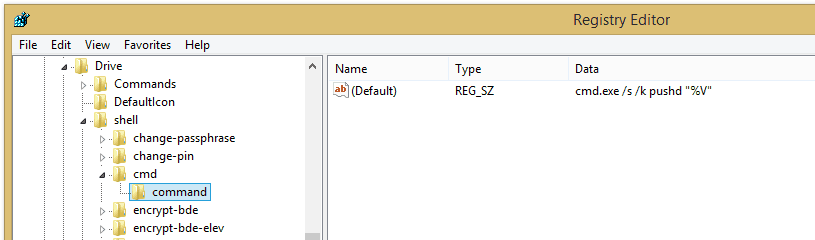
Step 2: Click on the regedit.exe file and reach to
HKEY_CLASSES_ROOT > Drive > Shell > cmd
Step 3: Right-click the Extended key to rename it Or you can delete the key, but again remember this action can difficult to return to the default settings.
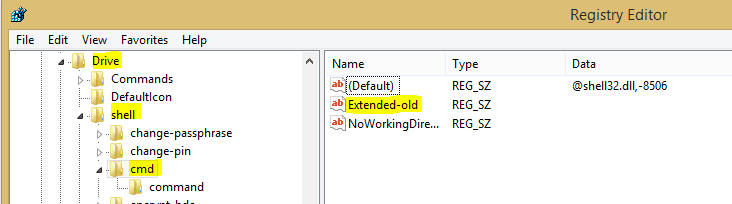
This change adds the option to Windows Explorer.
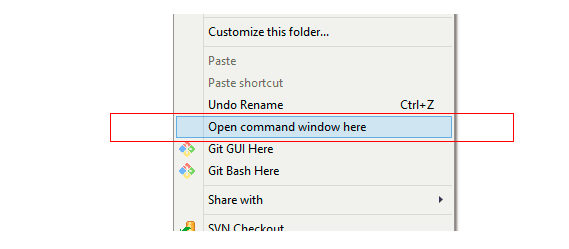
Now you did, just need to close the registry editor, now right click on a folder and you will see 'Open command window here' as a new context menu option.



 About UsFind out working team
 AdverisementBoost your business at
 Need Help?Just send us a
 We are SocialTake us near to you,